Stop Sharing Your Secrets: Switch to Asymmetric Signatures
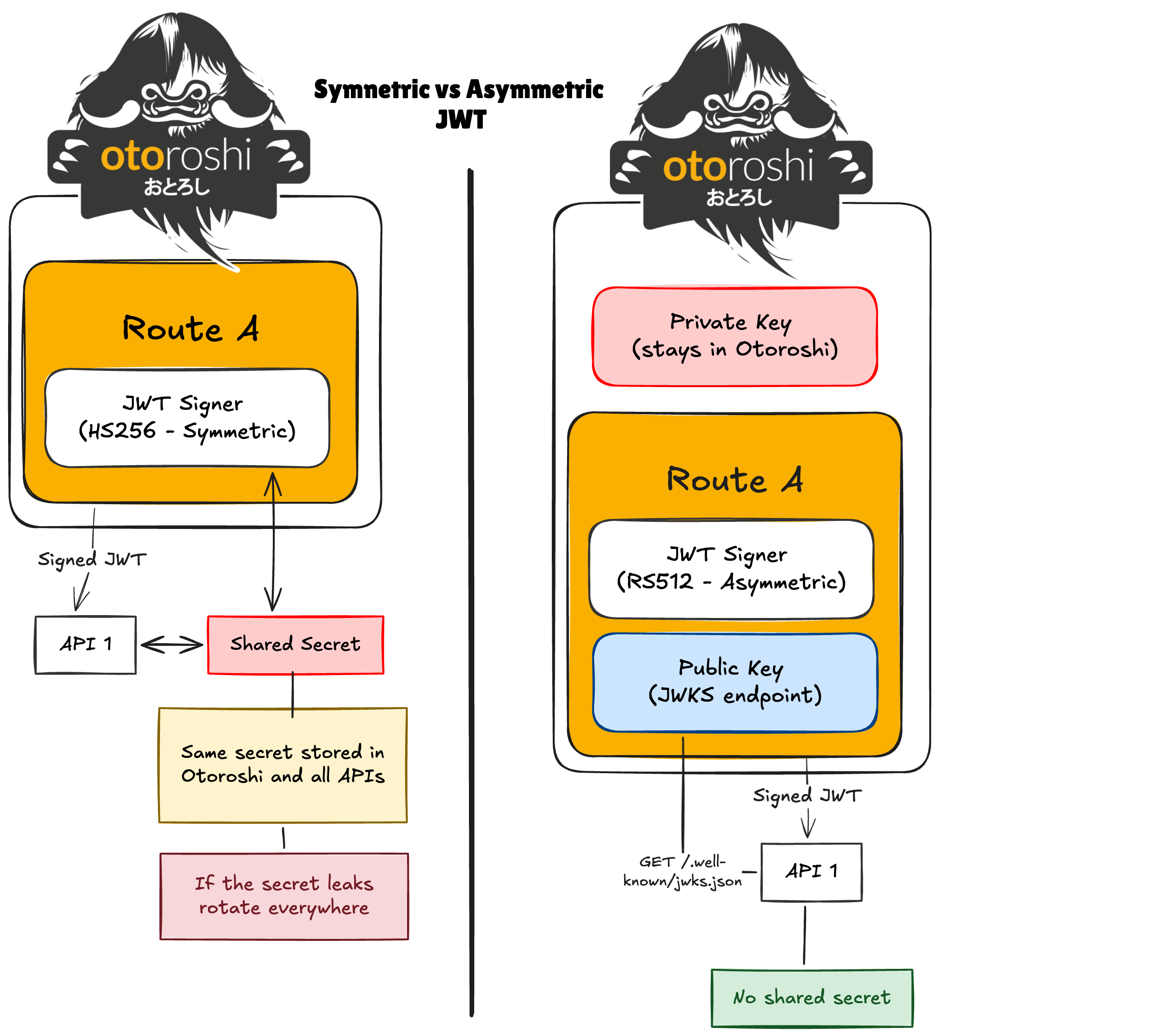
Managing the security of 200 APIs is a bit like changing the locks on 200 apartments.
With symmetric signatures, everyone shares the same secret. It works — until the day that secret leaks. Then you must rotate it everywhere. Across teams. Across environments. Across CI pipelines.
That is the fundamental limitation of symmetric JWT signatures.
The modern best practice is asymmetric signing:
- The issuer keeps a private key that never leaves its environment.
- APIs receive only the public key.
- Anyone can verify the token.
- No one can forge it.
Before you start
If you already have a running Otoroshi instance, you can skip the following instructions.
Download the latest Otoroshi release:
curl -L -o otoroshi.jar 'https://github.com/MAIF/otoroshi/releases/download/v17.12.0-dev/otoroshi.jar'
Start Otoroshi with a custom admin password:
java -Dotoroshi.adminPassword=password -jar otoroshi.jar
Once started, access the Otoroshi admin UI at http://otoroshi.oto.tools:8080 using the credentials admin@otoroshi.io/password.
The Solution: Asymmetric JWT Signing at the Gateway
Otoroshi can:
- Sign JWT tokens using an asymmetric key pair
- Automatically expose the public key through a standard JWKS endpoint
- Let backend APIs verify tokens without sharing secrets
Step 1: Create an asymmetric key pair
First, create a key pair using Otoroshi’s Admin API:
curl -X POST "http://otoroshi-api.oto.tools:8080/apis/security.otoroshi.io/v1/jwt-verifiers" \
  -u admin-api-apikey-id:admin-api-apikey-secret \
  -H "Content-Type: application/json" \
  -d '{
  "type": "global",
  "id": "jwt_verifier_dev_f3fca25f-9d03-4ea4-b342-5d8011cc0a91",
  "name": "Asymmetric signature",
  "desc": "Asymmetric signature",
  "strict": false,
  "source": {
    "type": "InHeader",
    "name": "Authorization",
    "remove": "Bearer "
  },
  "algoSettings": {
    "type": "RSAKPAlgoSettings",
    "size": 512,
    "certId": "otoroshi-jwt-signing"
  },
  "strategy": {
    "type": "DefaultToken",
    "strict": false,
    "token": {
      "iss": "http://asym.oto.tools:8080/.well-known/otoroshi/security/jwks.json"
    },
    "verificationSettings": {
      "fields": {},
      "arrayFields": {}
    }
  }
}'
By default, Otoroshi generates a key pair that can be used to sign asymmetric tokens.
The private key is stored securely within Otoroshi, while the public key is automatically made available through a JWKS endpoint.
Step 2: Create a route that signs JWTs
Now create a route that issues signed JWTs:
curl -X POST "http://otoroshi-api.oto.tools:8080/apis/proxy.otoroshi.io/v1/routes" \
  -u admin-api-apikey-id:admin-api-apikey-secret \
  -H "Content-Type: application/json" \
  -d '{
  "_loc": {
    "tenant": "default",
    "teams": [
      "default"
    ]
  },
  "name": "Asymmetric issuer",
  "description": "Endpoint that issues JWTs signed with Otoroshi’s asymmetric key pair, allowing secure verification using the public key exposed via the JWKS endpoint.",
  "tags": [],
  "metadata": {},
  "enabled": true,
  "debug_flow": false,
  "export_reporting": false,
  "capture": false,
  "groups": [
    "default"
  ],
  "bound_listeners": [],
  "frontend": {
    "domains": [
      "asymmetric-issuer.oto.tools"
    ],
    "strip_path": true,
    "exact": false,
    "headers": {},
    "cookies": {},
    "query": {},
    "methods": []
  },
  "backend": {
    "targets": [
      {
        "hostname": "request.otoroshi.io",
        "port": 443,
        "tls": true
      }
    ]
  },
  "plugins": [
    {
      "enabled": true,
      "plugin": "cp:otoroshi.next.plugins.OverrideHost"
    },
    {
      "plugin": "cp:otoroshi.next.plugins.JwtSigner",
      "enabled": true,
      "config": {
        "verifier": "jwt_verifier_dev_f3fca25f-9d03-4ea4-b342-5d8011cc0a91",
        "replace_if_present": true,
        "fail_if_present": false
      }
    }
  ]
}'
Every request routed through asymmetric-issuer.oto.tools:8080 now receives a JWT signed with the private key.
Step 3: Retrieve the public key (JWKS)
Otoroshi automatically exposes the public keys used to sign JWTs at the JWKS endpoint:
http://asymmetric-issuer.oto.tools:8080/.well-known/otoroshi/security/jwks.json
Your backend APIs only need to fetch this endpoint to validate incoming JWTs. There’s no need for shared secrets, manual key distribution, or duplicating keys.
A key concept here is the kid (Key ID): each JWT header contains a kid that tells your backend which public key to use for verification. This allows Otoroshi to rotate keys safely without breaking existing tokens — your backend automatically picks the correct key from the JWKS.
Example with curl to fetch JWKS and see the keys:
curl -s http://asymmetric-issuer.oto.tools:8080/.well-known/otoroshi/security/jwks.json | jq .
Sample output:
  "keys": [
    {
      "kid": "abc123",
      "kty": "RSA",
      "n": "...",
      "e": "AQAB"
    }
  ]
}
Here, kid (abc123) matches the kid in the JWT header, ensuring your backend uses the correct key to validate the signature.
Step 4: Verify the token on an API
A backend service can validate tokens using the JWKS endpoint.
Example request to your API:
curl http://asymmetric-issuer.oto.tools:8080
How it works:
- The backend receives a JWT in the request.
- It fetches the corresponding public key from the JWKS endpoint:
http://asymmetric-issuer.oto.tools:8080/.well-known/otoroshi/security/jwks.json
- It verifies the token’s signature using the key identified by the JWT’s kid
Key points:
Only Otoroshi can generate valid tokens. Every API can independently verify tokens. No shared secrets or manual key distribution are required.
Key Rotation
When you rotate keys:
- Generate a new key pair
- Otoroshi updates the JWKS automatically
- APIs fetch updated public keys
- No redeployment required
This enables safe, scalable security across hundreds of APIs.
Summary
What we accomplished:
- Generated an asymmetric key pair inside Otoroshi
- Signed JWT tokens using a private key
- Exposed public keys automatically through a JWKS endpoint
- Allowed backend APIs to validate tokens without sharing secrets
- Enabled safe key rotation at scale
Plugins used: