Teams
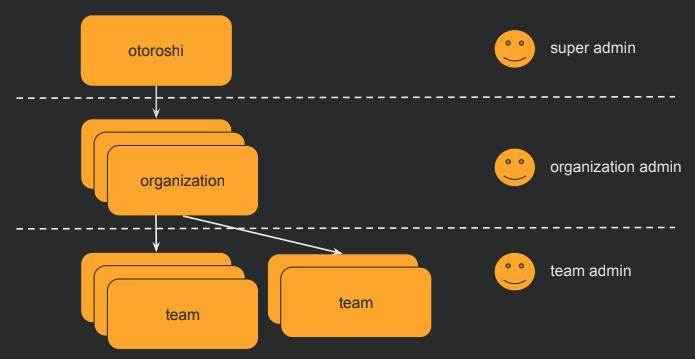
In Otoroshi, all resources are attached to an Organization and one or more Teams. Teams provide a second level of grouping within an organization, allowing you to control visibility and access to entities.
UI page
You can find all teams here
Properties
| Property | Type | Description |
|---|---|---|
id | string | Unique identifier of the team |
tenant | string | The organization this team belongs to |
name | string | Display name of the team |
description | string | Description of the team |
tags | array of string | Tags for categorization |
metadata | object | Key/value metadata |
Use cases
- Access control: Restrict which admin users can see and modify specific entities by assigning them to teams
- Resource organization: Group related entities (routes, API keys, certificates) by team so each team sees only their own resources
- Delegation: Allow team leads to manage their own resources without having access to other teams' configurations
Entities location
Every Otoroshi entity has a location property (_loc when serialized to JSON) that includes the teams the entity belongs to.
An entity visible to specific teams:
{
  "_loc": {
    "tenant": "organization-1",
    "teams": [
      "team-1",
      "team-2"
    ]
  }
}
An entity visible to all teams in the organization:
{
  "_loc": {
    "tenant": "organization-1",
    "teams": [
      "*"
    ]
  }
}
User access control
Admin users have team-level access rights that determine what they can read and write:
{
  "rights": [
    {
      "tenant": "organization-1",
      "teams": [
        { "value": "team-backend", "canRead": true, "canWrite": true },
        { "value": "team-frontend", "canRead": true, "canWrite": false }
      ]
    }
  ]
}
In this example, the user has full access to the backend team's entities but can only view (not modify) the frontend team's entities.
JSON example
{
  "id": "team_platform",
  "tenant": "organization_production",
  "name": "Platform Team",
  "description": "Team responsible for platform infrastructure",
  "metadata": {
    "lead": "alice@example.com"
  },
  "tags": ["platform", "infrastructure"]
}
Admin API
GET    /api/teams           # List all teams
POST   /api/teams           # Create a team
GET    /api/teams/:id       # Get a team
PUT    /api/teams/:id       # Update a team
DELETE /api/teams/:id       # Delete a team
PATCH  /api/teams/:id       # Partially update a team
When a team is deleted, the resources associated are not deleted. The team reference on those resources will become invalid (empty).
Related entities
- Organizations - Each team belongs to exactly one organization
- Otoroshi Admins - Admin users have rights scoped to specific teams