Organizations
Organizations (also called tenants) are the highest level for grouping resources in Otoroshi. Every entity in Otoroshi belongs to an organization and one or more teams.
UI page
You can find all organizations here
Properties
| Property | Type | Description |
|---|---|---|
id | string | Unique identifier of the organization (also called tenant) |
name | string | Display name of the organization |
description | string | Description of the organization |
tags | array of string | Tags for categorization |
metadata | object | Key/value metadata |
Use cases
Organizations let you separate resources by logical boundaries:
- Business units: Separate resources by services or departments in your enterprise
- Internal vs. external: Split internal services from partner-facing or public services
- Environments: Use different organizations for production, staging, and development (though this can also be handled at the infrastructure level)
- Multi-tenancy: Serve multiple independent customers from a single Otoroshi instance
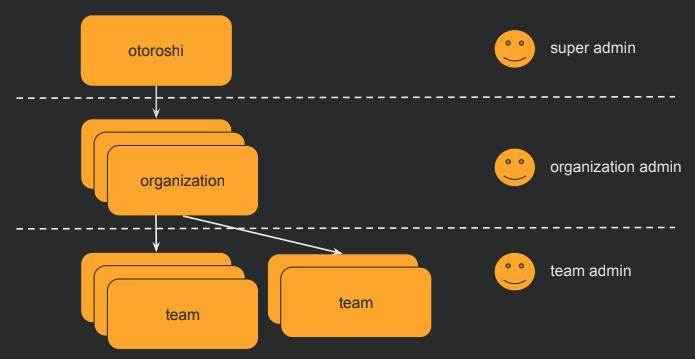
Entities location
Every Otoroshi entity has a location property (_loc when serialized to JSON) that specifies which organization and teams can see and manage it.
An entity belonging to a specific organization:
{
  "_loc": {
    "tenant": "organization-1",
    "teams": ["team-1", "team-2"]
  }
}
An entity visible to all organizations:
{
  "_loc": {
    "tenant": "*",
    "teams": ["*"]
  }
}
User access control
Admin users have rights scoped to organizations and teams. A user's rights field defines which organizations they can access and what level of access they have:
{
  "rights": [
    {
      "tenant": "organization-1",
      "teams": [
        { "value": "team-1", "canRead": true, "canWrite": true },
        { "value": "team-2", "canRead": true, "canWrite": false }
      ]
    }
  ]
}
This allows fine-grained control: a user may have read/write access to one team's entities and read-only access to another's, all within the same organization.
JSON example
{
  "id": "organization_production",
  "name": "Production",
  "description": "Production environment organization",
  "metadata": {
    "env": "production"
  },
  "tags": ["production", "core"]
}
Admin API
GET    /api/tenants           # List all organizations
POST   /api/tenants           # Create an organization
GET    /api/tenants/:id       # Get an organization
PUT    /api/tenants/:id       # Update an organization
DELETE /api/tenants/:id       # Delete an organization
PATCH  /api/tenants/:id       # Partially update an organization
When an organization is deleted, the resources associated are not deleted. The organization reference on those resources will become invalid (empty).
Related entities
- Teams - Teams exist within organizations and provide a second level of grouping
- Otoroshi Admins - Admin users have rights scoped to organizations and teams