Service groups
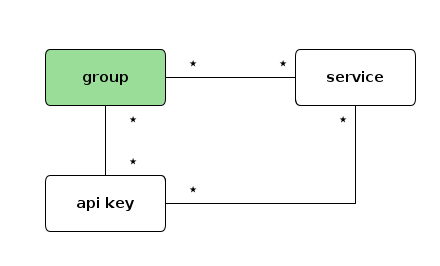
A service group is a logical grouping of services (routes, APIs) primarily used for API key authorization. Instead of authorizing an API key for each individual service, you can group services together and grant authorization on the entire group.
UI page
You can find all service groups here
Properties
| Property | Type | Description |
|---|---|---|
id | string | Unique identifier of the group |
name | string | Display name of the group |
description | string | Description of the group |
tags | array of string | Tags for categorization |
metadata | object | Key/value metadata |
How it works
- Create a group with a meaningful name (e.g., "Payment APIs", "Public APIs")
- Assign routes to the group by adding the group ID to a route's
groupsfield - Authorize API keys on the group using the API key's
authorizedEntitiesfield
When an API key is authorized on a group, it automatically has access to all routes that belong to that group. This simplifies API key management significantly when you have many routes that share the same access control requirements.
JSON example
{
  "id": "group_payment_apis",
  "name": "Payment APIs",
  "description": "All payment-related API routes",
  "metadata": {
    "department": "finance"
  },
  "tags": ["payment", "finance"]
}
Authorizing an API key on a group
In the API key entity, reference the group in authorizedEntities:
{
  "clientId": "my-api-key-id",
  "clientSecret": "my-api-key-secret",
  "clientName": "Payment service key",
  "authorizedEntities": ["group_payment_apis"]
}
Adding a route to a group
In the route entity, add the group ID to the groups array:
{
  "id": "route_process_payment",
  "name": "Process payment",
  "groups": ["group_payment_apis"],
  "frontend": { "..." : "..." },
  "backend": { "..." : "..." },
  "plugins": { "..." : "..." }
}
Admin API
GET    /api/groups           # List all service groups
POST   /api/groups           # Create a service group
GET    /api/groups/:id       # Get a service group
PUT    /api/groups/:id       # Update a service group
DELETE /api/groups/:id       # Delete a service group
PATCH  /api/groups/:id       # Partially update a service group
When a service group is deleted, the resources associated are not deleted. The group reference on those resources will become invalid (empty).