Teams
When multiple groups share a single Otoroshi instance, you need a way to keep each group's configuration separate. Without boundaries, one team can accidentally edit or delete another team's routes, API keys, or certificates. Teams solve this problem by organizing entities within an organization so that each group only sees and manages what belongs to them.
Multi-tenancy model
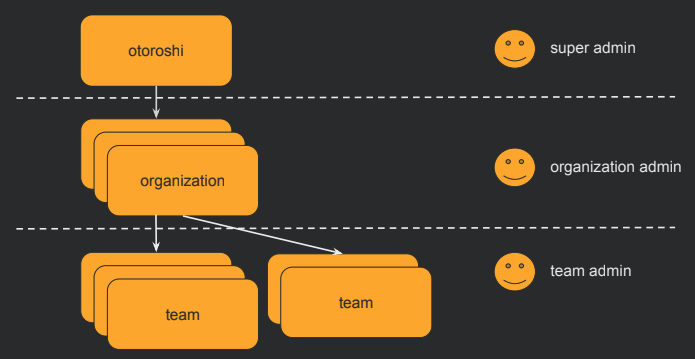
Otoroshi uses a two-level hierarchy for multi-tenancy:
Organization (tenant) > Team > Entities
Every entity in Otoroshi belongs to exactly one Organization and one or more Teams. Organizations provide broad isolation (for example, separating business units or environments), while teams provide fine-grained grouping within an organization. This structure lets you run a single Otoroshi instance for your entire infrastructure while still giving each team its own slice of the configuration.
Admin users can be scoped to specific organizations and teams. Each admin's rights define which teams they can read from and write to, making it possible to delegate management: a team lead can have full control over their own team's entities without being able to touch anything else. A super admin (with wildcard access) can manage everything across all organizations and teams.
This is lightweight multi-tenancy for shared infrastructure. Rather than running separate Otoroshi instances for each department or project -- with the operational overhead that entails -- you create teams within a shared instance and let the access control model enforce the boundaries. In small deployments with a single operator, teams can be ignored entirely (everything stays in the default team). In large deployments, they become essential for preventing configuration conflicts and maintaining clear ownership.
UI page
You can find all teams here
Properties
| Property | Type | Description |
|---|---|---|
id | string | Unique identifier of the team |
tenant | string | The organization this team belongs to |
name | string | Display name of the team |
description | string | Description of the team |
tags | array of string | Tags for categorization |
metadata | object | Key/value metadata |
Use cases
- Access control: Restrict which admin users can see and modify specific entities by assigning them to teams
- Resource organization: Group related entities (routes, API keys, certificates) by team so each team sees only their own resources
- Delegation: Allow team leads to manage their own resources without having access to other teams' configurations
Entities location
Every Otoroshi entity has a location property (_loc when serialized to JSON) that includes the teams the entity belongs to.
An entity visible to specific teams:
{
  "_loc": {
    "tenant": "organization-1",
    "teams": [
      "team-1",
      "team-2"
    ]
  }
}
An entity visible to all teams in the organization:
{
  "_loc": {
    "tenant": "organization-1",
    "teams": [
      "*"
    ]
  }
}
User access control
Admin users have team-level access rights that determine what they can read and write:
{
  "rights": [
    {
      "tenant": "organization-1",
      "teams": [
        { "value": "team-backend", "canRead": true, "canWrite": true },
        { "value": "team-frontend", "canRead": true, "canWrite": false }
      ]
    }
  ]
}
In this example, the user has full access to the backend team's entities but can only view (not modify) the frontend team's entities.
JSON example
{
  "id": "team_platform",
  "tenant": "organization_production",
  "name": "Platform Team",
  "description": "Team responsible for platform infrastructure",
  "metadata": {
    "lead": "alice@example.com"
  },
  "tags": ["platform", "infrastructure"]
}
Admin API
GET    /api/teams           # List all teams
POST   /api/teams           # Create a team
GET    /api/teams/:id       # Get a team
PUT    /api/teams/:id       # Update a team
DELETE /api/teams/:id       # Delete a team
PATCH  /api/teams/:id       # Partially update a team
When a team is deleted, the resources associated are not deleted. The team reference on those resources will become invalid (empty).
Related entities
- Organizations - Each team belongs to exactly one organization
- Otoroshi Admins - Admin users have rights scoped to specific teams