Organizations
Organizations (also called tenants) are the highest level for grouping resources in Otoroshi. They provide lightweight multi-tenancy, allowing multiple business units, projects, or environments to share a single Otoroshi instance while keeping their configurations fully isolated from one another.
The problem they solve
When a single Otoroshi instance serves several departments, clients, or environments, you need clear boundaries so that one group's routes, API keys, certificates, and other entities do not leak into another group's view. Organizations solve this by acting as a top-level isolation boundary: every entity in Otoroshi belongs to exactly one organization, and administrators can be scoped so they only see and manage the organizations they are responsible for.
This means you get the benefits of multi-tenancy -- resource isolation, scoped administration, independent configuration -- without the operational overhead of running separate Otoroshi instances for each group.
Hierarchy
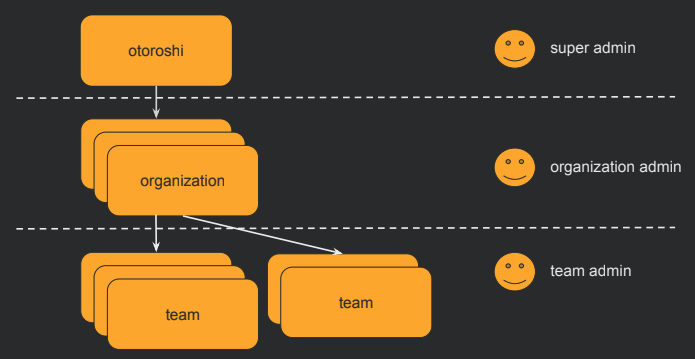
Organizations sit at the top of the resource hierarchy:
Organization > Team > Entities
An organization contains one or more teams, and teams contain entities (routes, API keys, certificates, etc.). This two-level structure gives you coarse-grained isolation at the organization level and fine-grained grouping at the team level.
Default organization
Otoroshi ships with a built-in default organization. When you start a fresh instance, all entities are automatically placed into
this default organization. You only need to create additional organizations when you want to introduce multi-tenancy.
Admin access control
Admin users can be scoped to specific organizations. A super-admin sees everything, but a tenant-scoped admin only has visibility into the organizations (and teams within them) that have been explicitly granted to them. This makes it safe to delegate administration: you can give a department full control over its own organization without exposing the rest of the platform.
When to use multiple organizations
Consider creating multiple organizations when:
- Different departments or business units share the same Otoroshi infrastructure but should not see each other's configuration
- You want to delegate admin access per team or project without granting global visibility
- You need a logical separation between environments (e.g., production vs. staging) on the same instance
- You serve multiple external customers from one Otoroshi deployment and need strict tenant isolation
If none of these apply, the single default organization is sufficient.
UI page
You can find all organizations here
Properties
| Property | Type | Description |
|---|---|---|
id | string | Unique identifier of the organization (also called tenant) |
name | string | Display name of the organization |
description | string | Description of the organization |
tags | array of string | Tags for categorization |
metadata | object | Key/value metadata |
Use cases
Organizations let you separate resources by logical boundaries:
- Business units: Separate resources by services or departments in your enterprise
- Internal vs. external: Split internal services from partner-facing or public services
- Environments: Use different organizations for production, staging, and development (though this can also be handled at the infrastructure level)
- Multi-tenancy: Serve multiple independent customers from a single Otoroshi instance
Entities location
Every Otoroshi entity has a location property (_loc when serialized to JSON) that specifies which organization and teams can see and manage it.
An entity belonging to a specific organization:
{
  "_loc": {
    "tenant": "organization-1",
    "teams": ["team-1", "team-2"]
  }
}
An entity visible to all organizations:
{
  "_loc": {
    "tenant": "*",
    "teams": ["*"]
  }
}
User access control
Admin users have rights scoped to organizations and teams. A user's rights field defines which organizations they can access and what level of access they have:
{
  "rights": [
    {
      "tenant": "organization-1",
      "teams": [
        { "value": "team-1", "canRead": true, "canWrite": true },
        { "value": "team-2", "canRead": true, "canWrite": false }
      ]
    }
  ]
}
This allows fine-grained control: a user may have read/write access to one team's entities and read-only access to another's, all within the same organization.
JSON example
{
  "id": "organization_production",
  "name": "Production",
  "description": "Production environment organization",
  "metadata": {
    "env": "production"
  },
  "tags": ["production", "core"]
}
Admin API
GET    /api/tenants           # List all organizations
POST   /api/tenants           # Create an organization
GET    /api/tenants/:id       # Get an organization
PUT    /api/tenants/:id       # Update an organization
DELETE /api/tenants/:id       # Delete an organization
PATCH  /api/tenants/:id       # Partially update an organization
When an organization is deleted, the resources associated are not deleted. The organization reference on those resources will become invalid (empty).
Related entities
- Teams - Teams exist within organizations and provide a second level of grouping
- Otoroshi Admins - Admin users have rights scoped to organizations and teams